See what an attacker sees
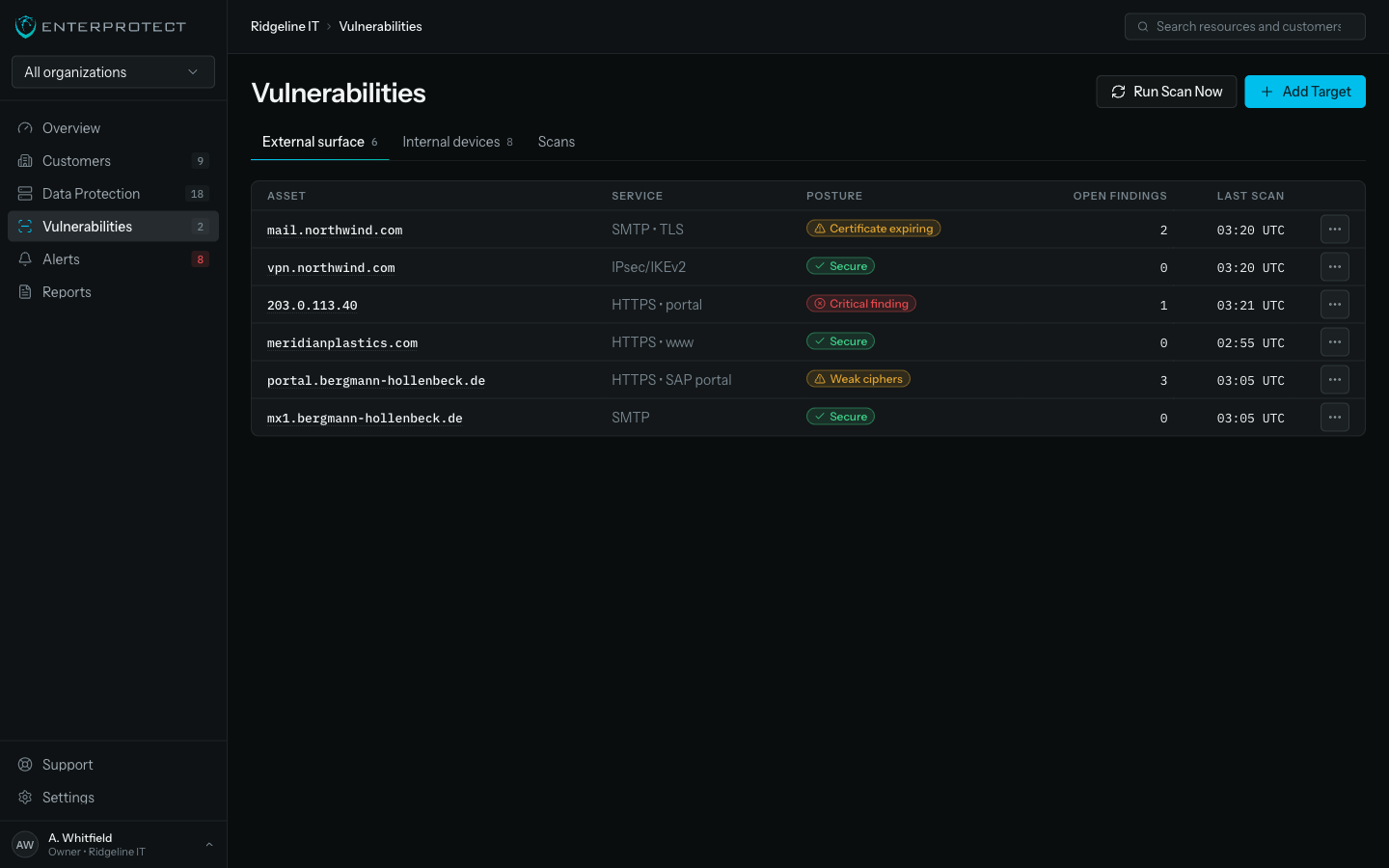
Coming soonYour client’s exposure changes every week, and nobody is watching it between annual reviews. Scan the outside and the inside from the platform you already run, with findings in the same queue your team already works.
Most scanners hand you a list
Most scanners hand you a PDF with hundreds of items, ranked by a score that means nothing to the client paying for it. The report gets filed, the exposure stays open, and the next scan produces the same list plus twelve more.
A separate inbox to ignore
A scanner with its own portal is one more place your team forgets to look.
Findings with no owner
A finding without a ticket, an owner, and a lifecycle is a note. Notes sit.
Coverage nobody can state
If you cannot say what was scanned and what was skipped, you cannot answer the only question that matters.
Findings arrive as work
Outside and inside
External scanning of every address your client exposes to the internet, and internal scanning of the networks behind them. Two views of the same organization, in one product family.
Nothing new to install
Internal scanning is a capability of the universal agent and the appliance you already deployed, enabled per organization. No second rollout, no new credentials to store, no extra attack surface bolted on to look for attack surface.
One queue, grouped by root cause
Findings land in the same alert queue as backup exceptions, with severity, owner, and lifecycle. High-volume classes group into their root cause before they page anyone. Your operators keep one to-do list.
Straight into your PSA
Create or link a ticket on any finding, routed by type to the right board in ConnectWise or CommandIT. Same lifecycle as every other alert. Remediation is tracked where your business already tracks work.
Coverage you can defend
Every discovered asset is scanned or is a deliberate, counted exclusion with a stated reason. There is no silent gap between what exists on the network and what was checked.
Evidence-grade reporting
Results land in the same reports surface as backup evidence: customer-ready, consistent, and exportable for a security questionnaire.
Two scan surfaces, one operating model
| Scan surface | What it examines | How it runs |
|---|---|---|
| External attack surface |
| From outside the network, per exposed address, on your schedule |
| Internal networks |
| Through the universal agent and the appliance already deployed at the site |
| Canonical devices |
| One device, many products, one page in the console |
Findings arrive where your team already works
Same queue, same lifecycle, same ticketing as a failed backup. There is no second inbox.
Three steps to managed exposure
Enable
Turn scanning on per organization. External targets take an address; internal scanning uses the agent and appliance already there.
Triage
Findings group by root cause into the shared queue. Assign, ticket, and resolve with the same grammar as every other alert.
Report
Send the client a report that states coverage, findings, and what changed since last time, from the same surface as their backup evidence.
Exposure is a business risk you already carry
When a client is breached through something visible from the internet, the conversation is about whether their provider was watching. Scan inside the platform and you can show that you were, in the same report they already read every month.
What we commit to
- Findings enter the shared alert queue. There is no separate inbox to forget.
- Every asset is scanned or is a counted exclusion with a stated reason.
- Scanning rides the agent and appliance you already run.
Questions buyers ask
Do I need to deploy another agent?
No. Internal scanning is a capability of the universal agent and the appliance you already run for backup, enabled per organization. There is no second rollout and no new credential store to protect.
How is this different from the scanner I already have?
Most scanners produce a report. This produces work: findings group by root cause, enter the same alert queue as everything else, carry an owner and a lifecycle, and open a PSA ticket routed to the right board.
Will it flood my technicians with alerts?
High-volume finding classes group into their root cause before they page anyone. The queue is built for triage at MSP scale, and it is the same queue your team already reads every morning.
What can I show the client?
A report from the same surface as their backup evidence: what was scanned, what was deliberately excluded and why, what was found, and what changed since last time. It answers the security questionnaire rather than starting a new conversation.
How do I know the scan covered everything?
Every discovered asset is scanned or is a counted exclusion with a stated reason. There is no silent gap between what exists on the network and what was checked.
Does this replace an EDR or a SOC?
No, and we will not pretend otherwise. This finds exposure and vulnerability so you can close it. Detection and response to an active attacker is a different job with different tools.